.:VIM (Video In Motion)
This article talks about and includes the instructions to enable Video In Motion. Basically it's enabling the MMI's ability to continue playing either the TV or DVD while the car is moving. This would be very handy for passengers because we would never watch TV or a DVD while driving right!!! There are laws regulating video being available to drivers so use this at your own risk and for testing only.
In order to enable this feature on your system you have to acquire a special log in code for the security portion of the coding. I have included an online version below you can use but also provided a windows program to do the same thing. Of course the advantage of having the program on your computer is you don't have to be connected to the internet during your installation.
You will require Microsoft's .NET Framework 3.5 to use this program (most will have it ). Don't worry if you don't have it you will be prompted to download it from Microsoft during the installation.
Either go to my download page or click here to download it.
Please note I am not the creator of this particular windows program. Use at your own risk. Information on the creator is available when you use the program.
*If you are using a VAS 505x use channel 001 to retrieve the serial number (first field). You must remove the leading zero from the generated login-code (4 digits instead of 5).
|
*Online Version available after manual decoding instructions. The first step is to retrieve the serial number of the Navigation Unit. For MMI 2G go to: For MMI 3G go to: You will find the serial number by clicking on the Advanced ID - 1A on the controller screen in VCDS. Generic screen shot shown below for reference. 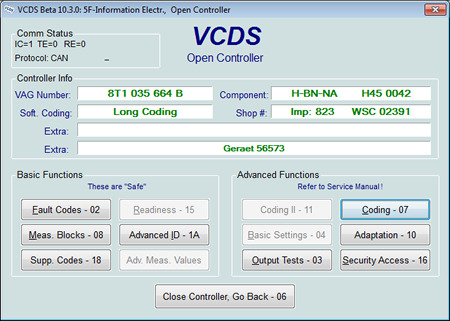
You can also obtain the serial number from any Auto Scan you have run with VCDS (see examples below). Example 2G: Example 3G: Manually Decoding Your Security Code: For the purpose of this sample we will use a made up serial number of : 331CE098765432 The digit order shows what order the number of the serial number will be put in for the security code. i.e. 1 is the first digit 3 would be the 3rd digit of the security code. There are 2 possible codes which is why there are 2 separate combinations shown Login code #1
Login code #2 (alternative code)
Code #1 = 03625
Code #2 =06542 |
| Automatic VIM Generator: |
|
After retrieving your Serial number enter it in the box below and click the "Generate" button. You will be presented with a primary (Code1) and secondary (Code 2) to use. Always start with Code 1. <--Enter Value Here
Use the security code you generated along with the instructions for your specific unit type (2G/3G) below. |
| Instructions 2G: |
|
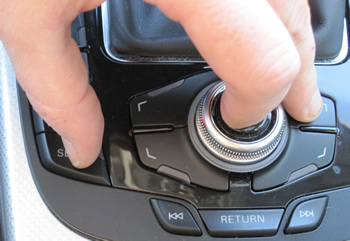
| Instructions 3G: |
|
Please note: AudiEnthusiast.com is in no way associated to Audi or VW in any way shape or form. All brand names and manufacturers listed here are for informational purposes only and are in no way endorsed by AudiEnthusiasts.com unless stated other wise.
WARNING!! All modifications and changes are done at your own risk. This site in no way approves the modifications performed here for your vehicle. Please check with your dealer before performing any changes as they may void portions of your factory warranty.